
AI-Bulletproof Design Stack
Jun 3, 2026
The exact toolkit, skills, and prompts used to make designs AI can't replicate.
Big announcement - Limora V2 is here
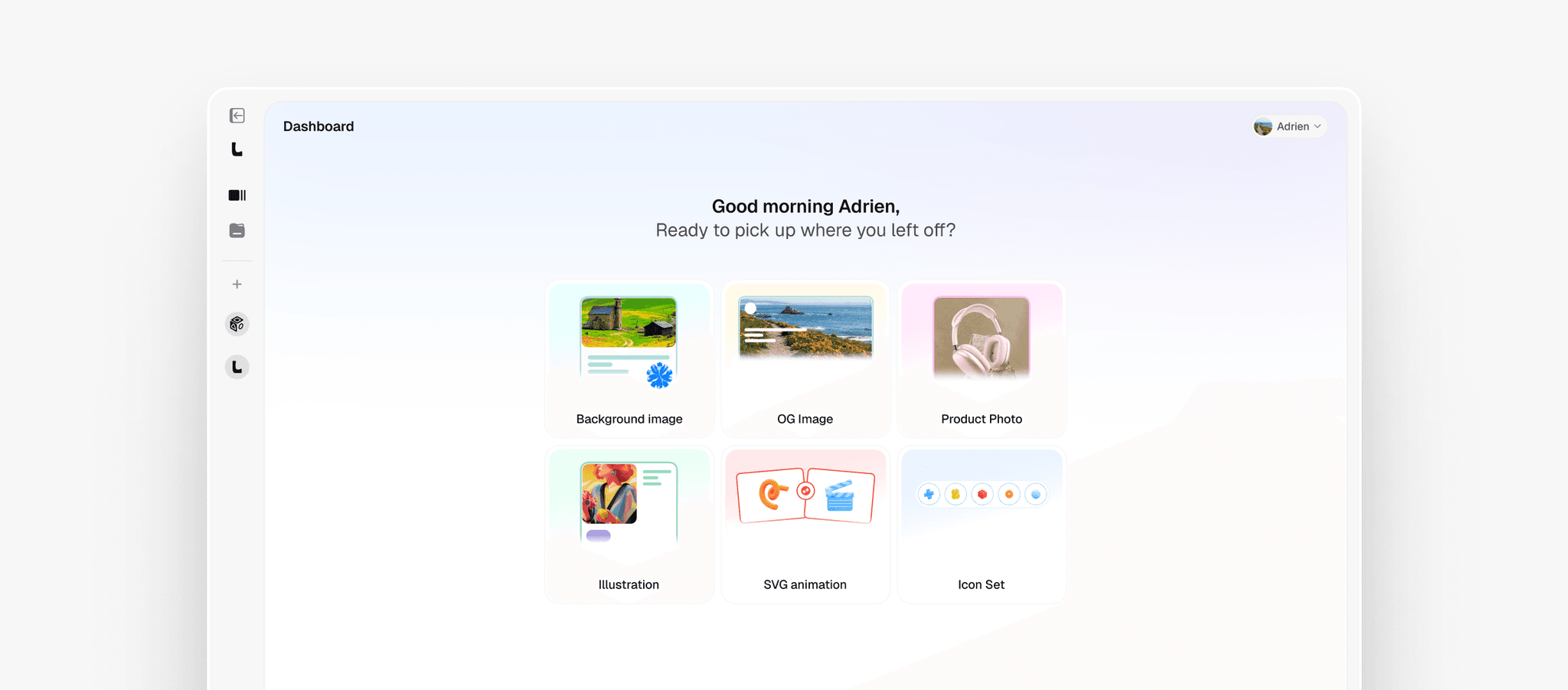
Before we dive in - I just released Limora, the AI design toolkit I built for myself and now use across every single client project.
Limora is not another "AI image generator." It's a full asset system for designers:
- Hero images - on-brand, story-driven, never generic
- Custom icons - match a single visual system, not Lucide defaults
- Illustrations - editorial quality, not stock vector art
- Image-to-Motion - animate any asset in 30 seconds
- Product photos, mockups, logo variations and more - 14 asset workflows total
If you're a designer trying to stay ahead in the AI era, this is the foundation.
👉 Get Limora V2 with 30% lifetime off (50 seats only)The 3 principles (full process)
Everything below is the exact process from the video - fully written out so you can replicate it, step by step.
Principle 1 - Original layouts & UX
Why this is principle #1: Layout is what AI defaults to most aggressively. Same hero, same 3-column grid, same FAQ. If your layout looks like everyone else's, no asset will save you.
The mental model: AI knows the average. Your job is to design the outlier.
Path A - If you wireframe with AI
Install these two Claude Code skills. They actively block generic patterns and push the model toward editorial, asymmetric, unexpected layouts.
- Taste Skill (web design / marketing sites)
Install:npx skills add Leonxlnx/taste-skill
Use case: landing pages, marketing sites, portfolios - Impeccable (web apps / product UI)
Install:npx impeccable install
Use case: SaaS dashboards, app UI, product interfaces
How to use them:
- Open Claude Code in your project
- Confirm the skill is loaded
- Prompt as normal - the skill silently rewrites the design brief in the background to avoid AI-default layouts
- Compare output with/without the skill enabled - the difference is dramatic
Path B - If you design manually
Mine these three inspo sources for asymmetric layouts, unexpected hierarchy, and editorial moves AI won't suggest:
- Unsection - curated outlier layouts, updated weekly
- Refero - searchable by component (hero, pricing, FAQ etc) - fastest way to find non-default versions
- Framer Templates - filter by "editorial" or "agency" - these are made by designers who know AI defaults and avoid them
Process:
- Before opening Figma, spend 15 minutes pulling 5 layouts you'd never default to yourself
- Save them to a Figma board called "This Project - Outlier Inspo"
- Reference that board, not your usual templates
Principle 2 - High-quality on-brand assets
Why this matters: Assets are the surface layer. They're what makes a design feel expensive or feel like a Canva template. The viewer's eye registers "cheap" in 0.3 seconds.
The bar: every asset should look like it was made for this brand only.
The tool: Limora
This is the one I just announced above. Here's how I use it on real client projects:
Hero images:
- Open Limora → Hero workflow
- Drop in the brand colors + 2-3 reference images that match the brand's vibe (not the literal product)
- Generate 4 variations
- Pick the one with the strongest narrative - drop it into the hero section
Custom icons:
- Limora → Icon workflow
- Define one visual system (e.g. "thin line, rounded, geometric") and stick with it
- Generate the full set in one session - never mix systems across one design
Illustrations:
- Limora → Illustration workflow
- Brief each illustration around a single story moment, not a generic concept
- One great illustration > five stock ones
Principle 3 - Tasteful motion
Why this is the moat: Static designs are easy to ship with AI. Considered motion is hard. It signals taste, restraint, and craft instantly. This is the layer AI can't fake yet - and almost nobody is doing it well.
The taste rule: One great animation > five mediocre ones. Restraint is the signal.
Path A - Animate assets with Limora
Limora Image-to-Motion feature animates any asset (hero, illustration, icon) in 30 seconds:
- Drop your generated hero image into Image-to-Motion
- Choose intensity: subtle / medium / dynamic (use subtle for premium feel)
- Choose the motion type: parallax, drift, breathing, reveal
- Export as MP4 or animated WebP
- Drop into Framer / Webflow / your codebase
Path B - Animate in code with Claude Code
For interaction-level motion (page transitions, hover states, scroll-driven animation), install these Claude Code skills:
- Emil Kowalski design skill
Install:npx skills add emilkowalski/skills
Specialty: tasteful UI motion, page transitions, micro-interactions - Transitions.dev skill
Install:claude skill install transitions-dev
Specialty: real transition primitives, not bouncy defaults
Process:
- Decide on ONE signature motion for the project (e.g. "all reveals fade-blur from 8px to 0")
- Prompt Claude Code with that single rule
- The skill ensures output uses real transition timing curves, not the default ease-in-out
The 3-principle audit checklist
Use this before shipping any design. If any answer is "no," fix it before launch.
Layouts & UX
- Did I avoid the default hero + 3-column + FAQ pattern?
- Is there one unexpected hierarchy or editorial move on this page?
- Could I show this to another designer without them guessing "AI-generated"?
Assets
- Are all hero images / illustrations custom (not stock)?
- Do all icons share one visual system?
- Could someone tell which brand this is from a single asset?
Motion
- Is there at least one piece of motion on this page?
- Is the motion restrained (not bouncy / not over-animated)?
- Does the motion add meaning, not just decoration?
Full tool stack - all links
Tools
- Limora V2 - AI design toolkit (30% off with BULLETPROOF, 50 seats)
- Claude Code - the AI agent you install skills into
Claude Code skills (install once, use forever)
- Taste Skill -
npx skills add Leonxlnx/taste-skill - Impeccable -
npx impeccable install - Emil Kowalski -
npx skills add emilkowalski/skills - Transitions.dev -
claude skill install transitions-dev
Inspo sites
- Unsection - outlier layouts
- Refero - search by component
- Framer Templates - filter editorial / agency