
Our 4-Hour Site Workflow
Apr 25, 2026 · 8 steps
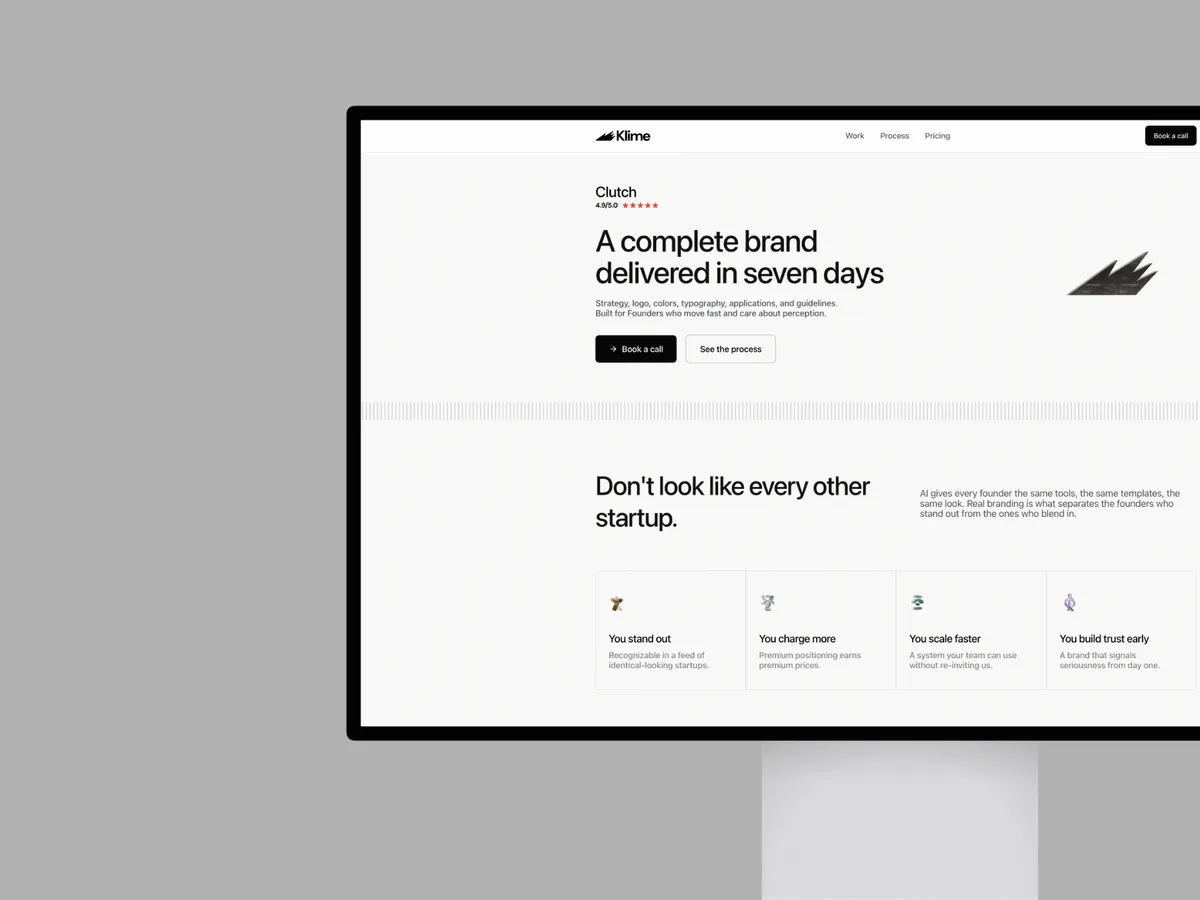
Here's the exact workflow we used at Klime Studio to rebuild our entire website from scratch - using AI tools, our existing brand identity, and a few skills that made all the difference.
- 1
Step 1
Start with your brand identity
Before you touch any AI tool, you need a solid brand identity. This is the foundation of everything.
Without one, every asset you generate will look disconnected. Your website will feel generic. Your social posts won't match your landing pages. And no matter how good the AI tool is, it can't create consistency from nothing.
A brand identity gives you a system - typography, colors, spacing, logo usage - that you can feed into any AI tool and get results that actually look like your brand. It's the single thing that separates a polished, professional output from another AI-generated site that looks like everything else.
Once you have it, you unlock a completely different workflow. You can generate websites, social assets, pitch decks, presentations - all consistent, all on-brand, in a fraction of the time.
We started by exporting our full brand identity from Figma - logo, typography, color system, spacing rules, everything.
Don't have a brand identity yet? We build complete brand systems for founders at Klime Studio - logo, typography, colors, spacing, brand applications. Everything you need to unlock this workflow.
👋 Book a call: klime.studio
- 2
Step 2
Generate a design system with Claude Design
We uploaded our brand identity into Claude Design.
The AI analyzed our brand guidelines and generated a complete design system - components, typography scales, spacing tokens, color applications. Everything we needed to start building.
Now, Claude Design doesn't give you a lot of credits yet, so we didn't build the full website inside the tool. Instead, we downloaded the design system it generated and moved to the next step.
- 3
Step 3
Build the site in Claude Opus 4.7
We uploaded the design system into Claude Opus 4.7 and started with the most important part: the site architecture.
We brainstormed the structure together with Claude - page hierarchy, sections, content flow - making sure everything was:
- Optimized for conversions
- Aligned with our branding
- Built around our offer
This step is crucial. The architecture defines whether visitors understand what you do and take action, or bounce after 3 seconds.
- 4
Step 4
Install Taste Skill
This is where it gets interesting.
We installed Taste Skill into Claude. This skill breaks the patterns that make AI-generated websites all look the same - the predictable layouts, the generic spacing, the cookie-cutter sections.
Taste Skill forces the AI to make design decisions that feel intentional and custom, not templated. It's the difference between "this was clearly made by AI" and "this looks like a studio built it."
- 5
Step 5
Add custom assets
AI can do a lot, but some things still need a human touch.
We created custom assets by hand - illustrations, graphics, visual elements - and dropped them into the site. This added a layer of craft and personality that no AI tool can replicate on its own.
The combination of AI-generated structure + hand-made assets is what gives the site its studio-level polish.
- 6
Step 6
Refine
From there, we just iterated. We went back and forth with Claude, tweaking layouts, adjusting spacing, refining copy, until everything felt right.
This is the part most people skip - and it's why most AI-generated sites look rushed. Take the time to refine.
- 7
Step 7
Animate with Remotion skill
We installed Remotion skill to add custom animations and SVG animations throughout the site.
This brought the whole thing to life - subtle motion that makes the experience feel polished and intentional, not static.
- 8
Step 8
Push to Vercel
Once everything was dialed in, we pushed the code to Vercel and the site was live.
Done. Four hours, start to finish.
The tools we used
- Figma - Brand identity source
- Claude Design - Design system generation
- Claude Opus 4.7 - Site architecture + build
- Taste Skill - Breaks AI-generated patterns
- Remotion skill - Custom animations
- Vercel - Hosting and deployment
Ready to unlock this workflow? We build brand systems for founders at Klime Studio. One brand identity - and every AI tool starts working for you.
👋 Book a call: klime.studio